
Ocex.exchange Perpetual Trading
1. What is Ocex.exchange Perpetual Trading?
Ocex.exchange Perpetual Trading allows users to long or short crypto assets with leverage without owning the underlying asset.
Perpetual contracts:
- Have no expiry date
- Track the spot price using a funding rate mechanism
- Allow profit from both upward and downward price movements
Key features:
- 📈 Long & Short positions
- ⚡ High leverage (pair dependent)
- 🔐 Non-custodial trading
- 🌐 On-chain perpetuals (similar mechanics to PancakeSwap Perps)
2. Supported Markets
Ocex.exchange supports major perpetual trading pairs such as:
- BTC / USDT
- ETH / USDT
- BNB / USDT
- Select high-liquidity altcoins
Each market includes:
- Maximum leverage
- Funding rate
- Maintenance margin
- Real-time liquidity data
3. Requirements Before Trading
Wallet Setup
Supported Web3 wallets:
- MetaMask
- Trust Wallet
- WalletConnect-compatible wallets
Network
Supported blockchain network (as used by Ocex.exchange). Native gas token required for transactions.
Trading Capital
USDT (used as margin)
4. Connect Wallet to Ocex.exchange
- Visit Ocex.exchange → Perpetual Trading
- Click Connect Wallet
- Approve wallet connection
- Switch to the correct network if prompted

5. Key Trading Concepts Explained
- Long Position
Profit when the asset price increases - Short Position
Profit when the asset price decreases - Leverage
Multiplier used to increase exposureExample: 5x leverage → $100 margin controls $500 position - Margin
Collateral used to open and maintain a position - Liquidation Price
The price at which your position is force-closed to prevent further losses - Funding Rate
A periodic fee exchanged between long and short traders
6. How to Open a Trade on Ocex.exchange
- Choose a Trading Pair
Select a perpetual market (e.g., ETH/USDT) - Select Order Type
• Market Order – Executes immediately
• Limit Order – Executes at your chosen price - Choose Position Direction
• 📈 Long (Buy)
• 📉 Short (Sell) - Set Leverage
Adjust leverage using the slider⚠️ Recommended for beginners: 2x–5x - Enter Margin Amount
Input USDT amount to use as margin - Review & Open Position
Verify: Entry price, Liquidation price, Trading fees, Position size
Click Open Position
7. Opening a position
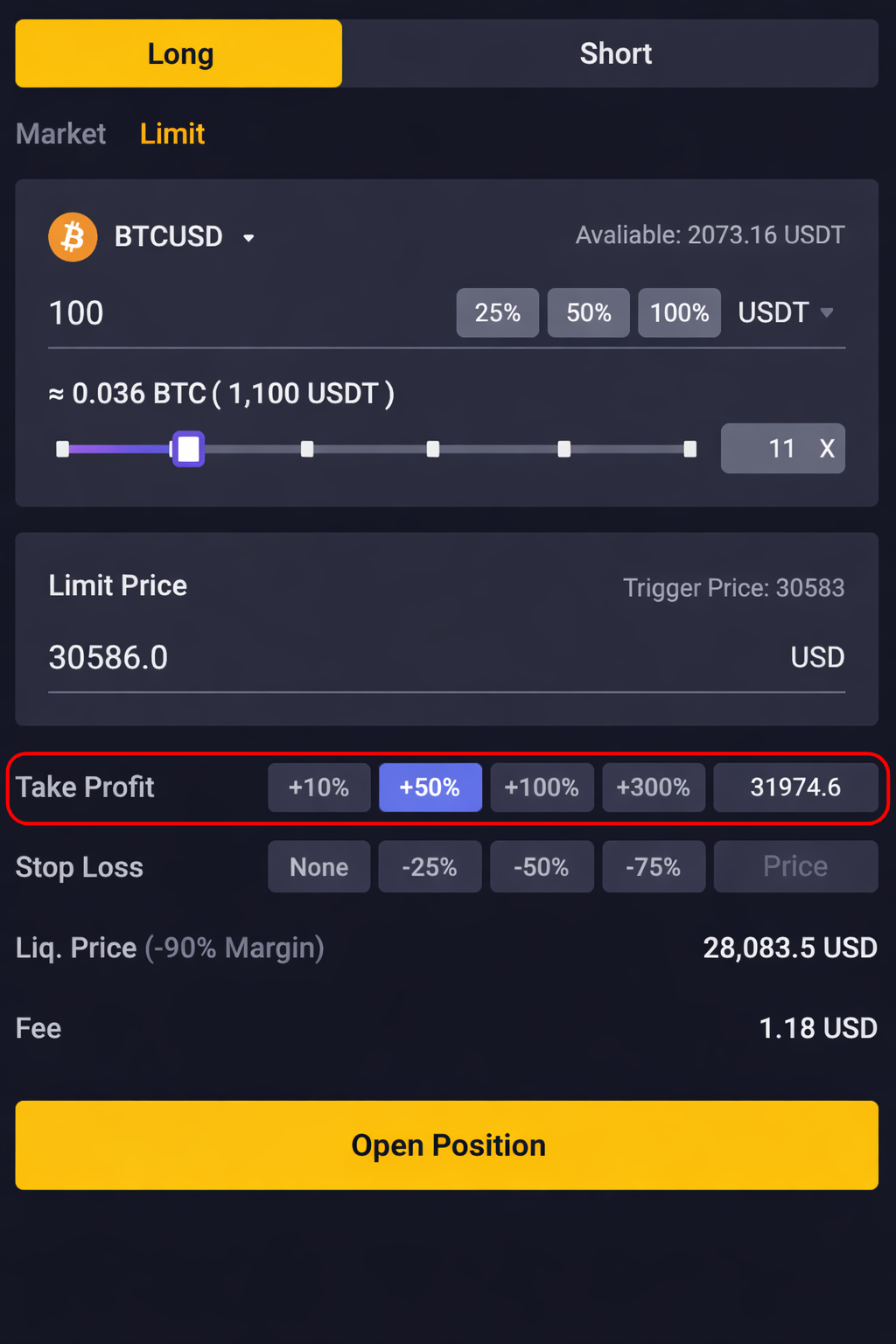
Users can choose to [Buy/Long] or [Sell/Short] to open their positions with leverage.
- Long position: If the price rises, you earn a profit. If the price falls, you make a loss.
- Short position: If the price falls, you earn a profit. If the price rises, you make a loss.
After selecting the Take Profit percentage, you will need to approve the transaction on your wallet to open the position successfully.
Collateral that can be use for trading
- BNB Chain - USDT, USDC, BNB, CAKE, HAY, ETH and BTC
- Arbitrum - USDT, USDC, DAI and ETH
- opBNB - USDT and BNB
- Base - USDbC and ETH
The settlement assets will be the user's input assets. If settlements assets are insufficient, the platform will select the asset with the highest accumulated value in the liquidity pool as the settlement asset.
8. How to Place Stop Orders
Users can set [Take profit] and [Stop loss] orders when they are placing their orders. When opening a position, users can set a take profit or stop loss price. When the specified price is reached, the order will be executed. If UnrealizedPNL <= 90%, the user's position will be liquidated. At the same time, the unrealizedPNL cap of each trade will be 90%. Even if users do not place any take profit or stop loss orders, the unrealizedPNL cap will be set at 90% by default.
9. Position Management
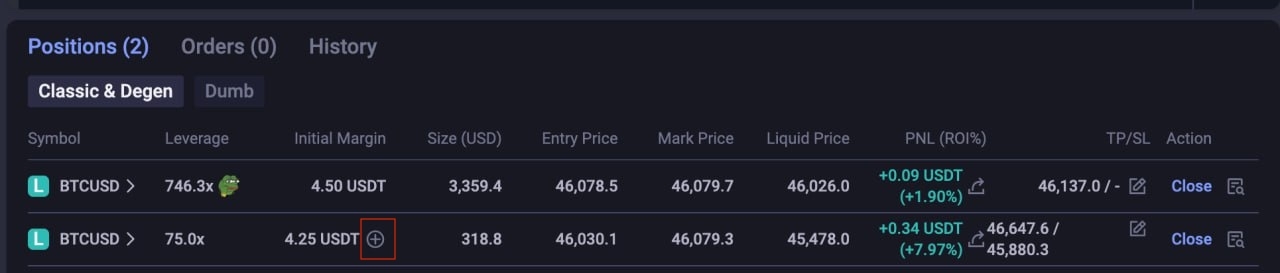
Users can check the details of their opened positions such as the opening price by clicking on "Position" located on the bottom of the trading page. They can view details such as opening price, number of positions, latest price and forced liquidation price.
Position mode
APX Finance will use isolated leverage mode for each V2 trading pair. Pairs operate independently:
- Each trading pair is an isolated position, Users can open multiple isolated positions.
- Every position (trading pair) runs independently. If users need to top up their margin, they will need to do so manually even if they have available assets in other separate positions (APX will support auto top-up in the future)
- Every isolated trading position will have its own risk rate and liquidation price, and will be settled individually.
- Liquidation risk is isolated for each trading pair. If a position is liquidated, it has no effect on other positions.
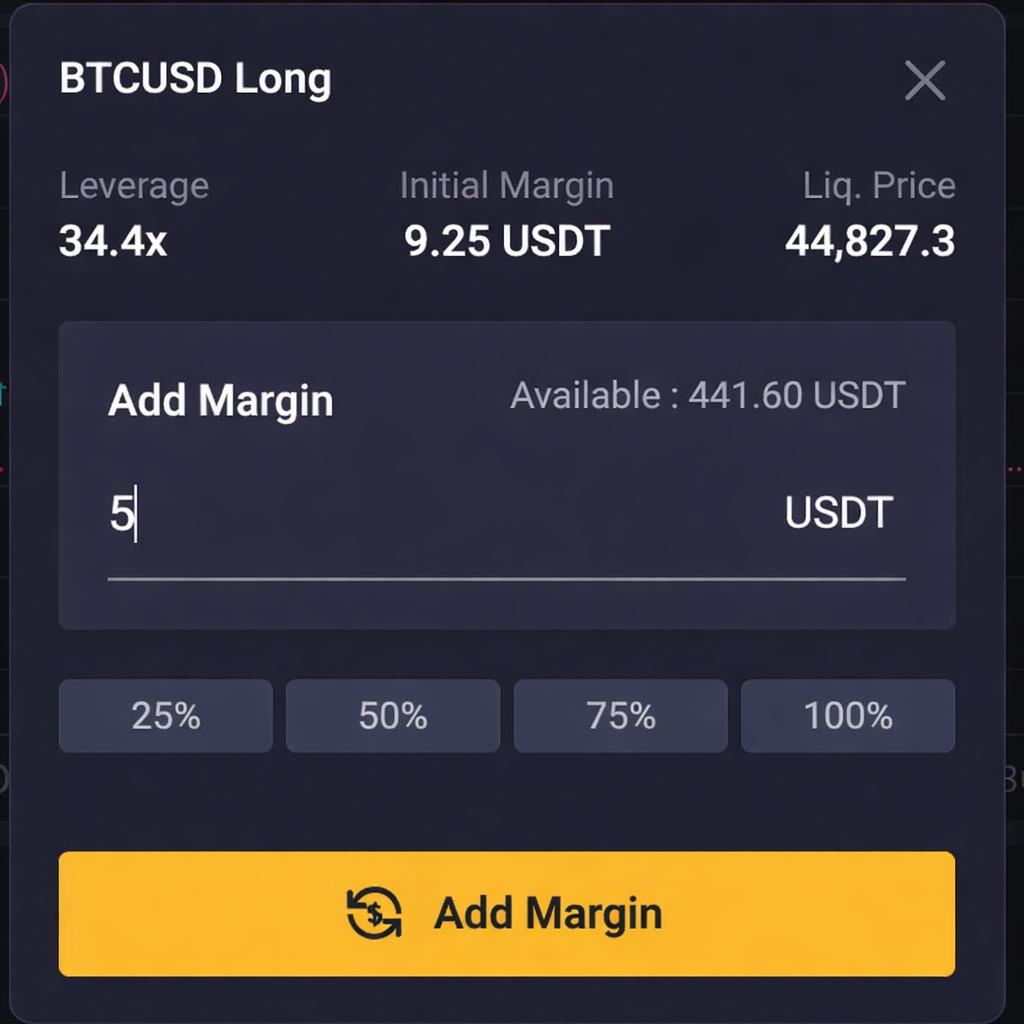
Adjusting initial margin
User can click on the "+" icon to add margin to running positions. This is only available on Classic mode and not Degen mode. For MADBTCUSD and MADCAKEUSD, users will not be able to add margin to positions having leverage 5x and below.
Closing a position
Users can close their positions by clicking on "Close".

10. One click close all position feature
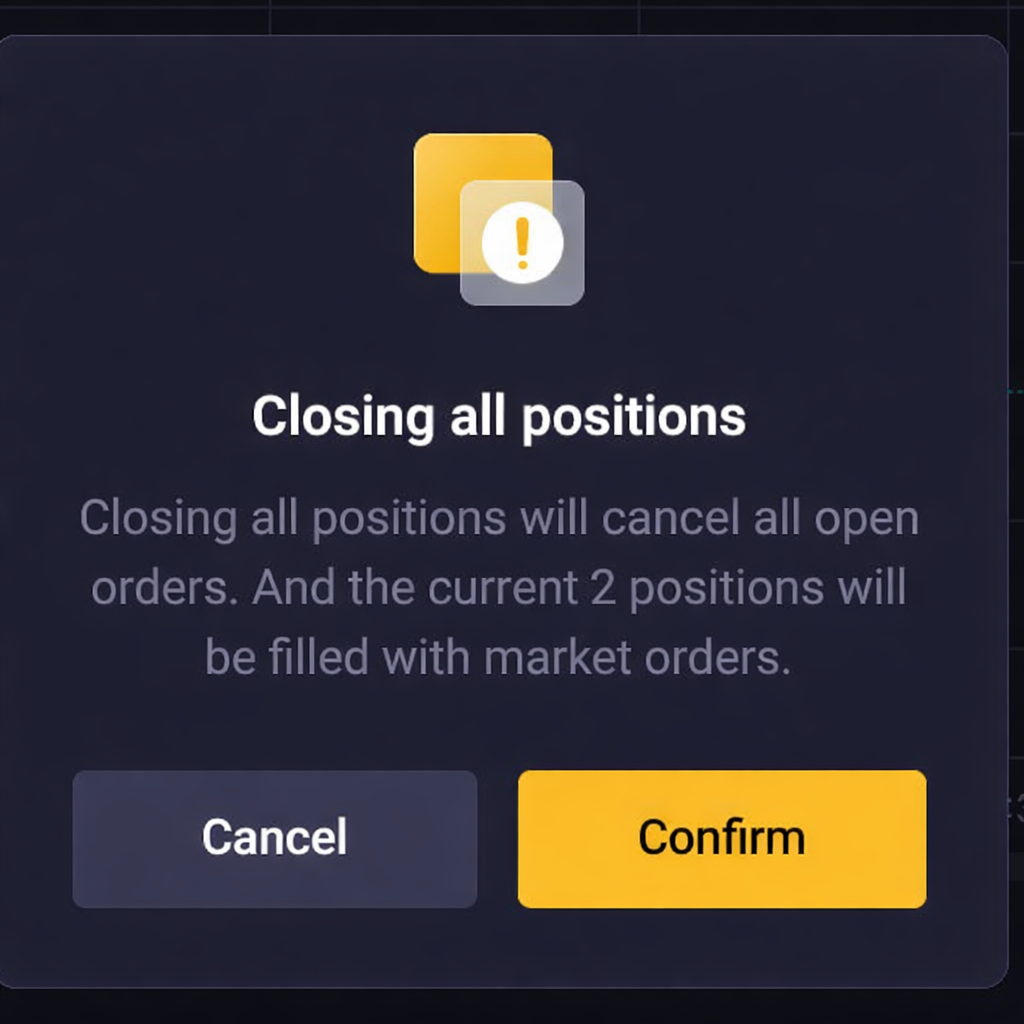
Users can close all their positions with one click by clicking on "Close All" located on the top right corner of the position section.
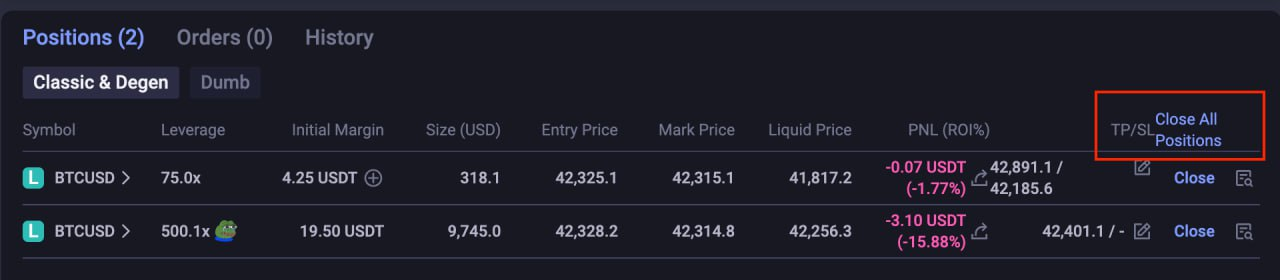
The corresponding number of running positions will be prompted. User will need to double confirm before closing all positions. Do take note using this feature will cancel all open orders as well.
11. Order Types
- Market order: A market order is a buy or sell order that gets filled right away at the best price currently available on the market.
- Limit order: A limit order lets you place an order at a specific price or a more favorable price. However, there's no guarantee that a limit order will be filled.
Limit buy orders are executed if the price of the asset hits the limit price or falls below that price.
Limit sell orders are executed if the price of the asset hits the limit price or rises above that price.
- Take Profit order: A take profit order is a type of limit order that you place to close an open position for a profit at an exact price.
- Stop Loss order: A stop loss order allows you to place an order at a specific price to close out a position to limit loss.
Do note that the opening fee and execution fee will be charged when a position is opened and this will be factored into the leverage amount.
Please be aware that trade orders may not be executed even if the target price is achieved. This can happen in situations such as, but not limited to, the following:
- The mark price, which is an aggregated price from various exchanges, did not attain the target price.
- The target price was attained but did not remain at that level long enough for the order to be executed.
- The order size surpasses the available open interest (OI).
12. Profit & Loss Calculation
Example (Long Trade)
- Entry Price: $2,000
- Exit Price: $2,100
- Leverage: 10x
- Margin: $100
Approximate profit: 50% of margin (excluding fees)
13. Trading Fees on Ocex.exchange
Fees typically include:
- Maker / Taker trading fees
- Funding fees (periodic)
Exact fees are shown before trade confirmation.
14. Risk Management Guidelines 🚨
- Start with low leverage
- Use Stop Loss orders
- Avoid using full wallet balance
- Monitor funding rates
- Trade with a clear strategy
15. Common Trading Mistakes
- Over-leveraging
- No stop-loss setup
- Emotional or revenge trading
- Ignoring liquidation price
- Trading low-liquidity pairs
16. Security & Safety
Ocex.exchange perpetuals are:
- Smart contract based
- Non-custodial
- On-chain transparent
However, risks include:
- Smart contract vulnerabilities
- Market volatility
- Oracle price fluctuations
Always trade responsibly.
17. Final Thoughts
Ocex.exchange Perpetual Trading provides a decentralized way to:
- Trade price movements
- Hedge positions
- Access leverage on-chain
With proper risk control and understanding, traders can effectively use Ocex.exchange perpetuals as part of their trading strategy.